Segurança Social Direta: How to Register and What You Can Do Online
Segurança Social Direta is where you manage contributions, request certificates, and file the quarterly self-employed declaration. Here's how to get registered.

- Separate from Portal das Finanças — built around your NISS, not your NIF.
- You need a NISS before you can register; foreign applicants use the current online NISS service and the document list for their work and residence situation.
- An already active Chave Móvel Digital can avoid the registration-letter wait; an inactive CMD must be activated first.
- Freelancers file a quarterly declaration here that sets their Social Security contribution.
Start at the official Social Security portal. Segurança Social Direta (SSD) handles contributions and benefits using your NISS, not the Finanças NIF. Citizen Card holders already have a NISS; other applicants should check for an existing number before requesting one. This guide explains registration, password recovery and the separate contact-verification problem.
How do I get a declaration of contribution status from Social Security?
Request a declaração de situação contributiva, not a quarterly income declaration or a contribution-career statement. gov.pt says it certifies whether your Social Security situation is regularised or you have debts and can be obtained online, by post or at a service desk. Someone who has never worked and needs it for school or another non-debt purpose should request it at a Social Security desk.
How long is the Social Security contribution-status certificate valid?
Four months. This is the validity of the declaração de situação contributiva under Article 84 of Decreto Regulamentar 1-A/2011, not the period covered by a quarterly declaration. Article 83 sets a maximum issue period of ten days from the request; do not assume every request is issued instantly. The certificate is not a receipt settling all liabilities and does not prevent later assessments.
Need this certificate? Use the contribution-status certificate guide to distinguish the documents, request the declaration and check its validity.
Choose the route before requesting a code
For a benefit application rather than account access, follow the IEFP registration and unemployment guide or the parental-benefit application guide. Each separates registration, documents, deadlines and the actual decision.
| Your situation | Use this route |
|---|---|
| Active CMD and an existing NISS | Autenticação.gov > Chave Móvel Digital; authenticate with your own PIN/security code. |
| NISS but no SSD password | Registar, receive the verification code, then Ativar conta. Sending the request alone does not activate the account. |
| Forgotten SSD password | Recuperar palavra-passe; citizen identification asks for NISS and date of birth, then the verification channel. |
| Password works but the second code is inaccessible | Use the remaining registered contact, or Citizen Card/CMD, or update contacts in person if neither is available. |
| No NISS yet | Request the identifier first. A tax number or CMD does not replace the NISS record. |
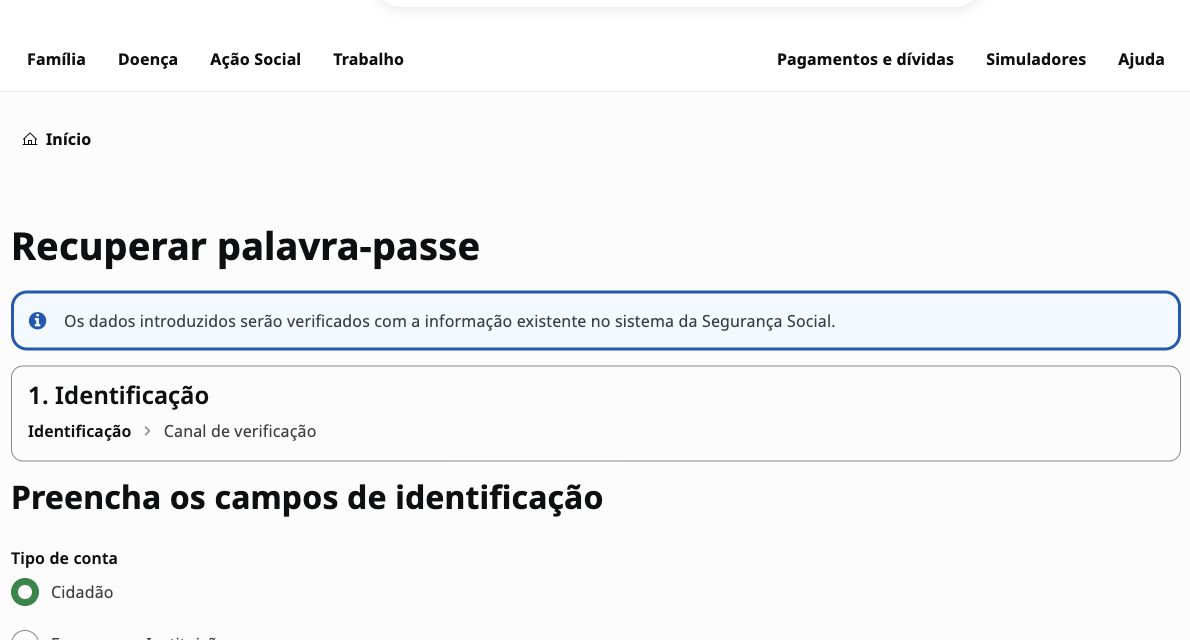
The official password-recovery form is different from initial registration. Choose Cidadão for an individual, check the NISS and birth date against the Social Security record, and follow the verification channels offered. A new password request will not by itself repair an old phone number. If identification is rejected, verify the record with Social Security rather than repeatedly creating accounts or treating the message as proof you have no contribution rights.
What the password-recovery screen looks like
- Open the official page yourself
Use the recovery link above and check that the domain is seg-social.pt. Select Cidadão for your personal account. Empresa and Subcontas are different account types, not alternative ways to recover an individual's password.
- Complete identification privately
Further down the form, enter your own NISS and birth date using the displayed format. Do not send those details, a password or a one-time code to Finkavo. A rejected entry is an access problem to resolve with Social Security, not a decision about your benefits.
- Check that access really works
Follow the verification channel offered by the official service. After recovery, test a fresh login and check your contact details. If you cannot receive the second-factor code, use the contact-recovery route below; resetting the password again does not restore a lost email account or phone number.
Practical access aid checked on 15 October 2026 against the public recovery form and Social Security's two-factor help. If both registered contacts are unavailable, use Citizen Card or Chave Móvel Digital through Autenticação.gov; without that alternative, update the contacts in person. Keep any support reference, but do not publish a screenshot containing your NISS or verification code.
How to register
- Go to seg-social.pt and start registration
Click "Iniciar sessão", then "Autenticação com o seu utilizador da Segurança Social", then "Registar". Accept the terms and choose the type of account you want.
- Enter your NISS and date of birth
These identify your Social Security record — you need a NISS before you can register (see our NIF/NISS guide if you don't have one).
- Choose how to receive your verification code
Choose a recorded email or mobile contact; without recorded contacts, the offered route is post to your Social Security address. The May 2026 guide says normally eight working days, not a guaranteed delivery deadline. A correctly recorded foreign mobile number is allowed.
- Activate your account
Go to "Ativar conta", enter your NISS and the verification code you received, then set and confirm a permanent password.
- Sign in and validate your recovery contacts
After activation, sign in with the new password. Check and validate (fidelizar) your email and phone under Perfil > Dados pessoais > Consultar/alterar contactos. NISS/password login also requires the security code sent to a registered contact.
What you can do once you're in
- Workers and beneficiaries: review registered remuneration and contribution history, consult benefit records, request available declarations and keep contact or bank details current.
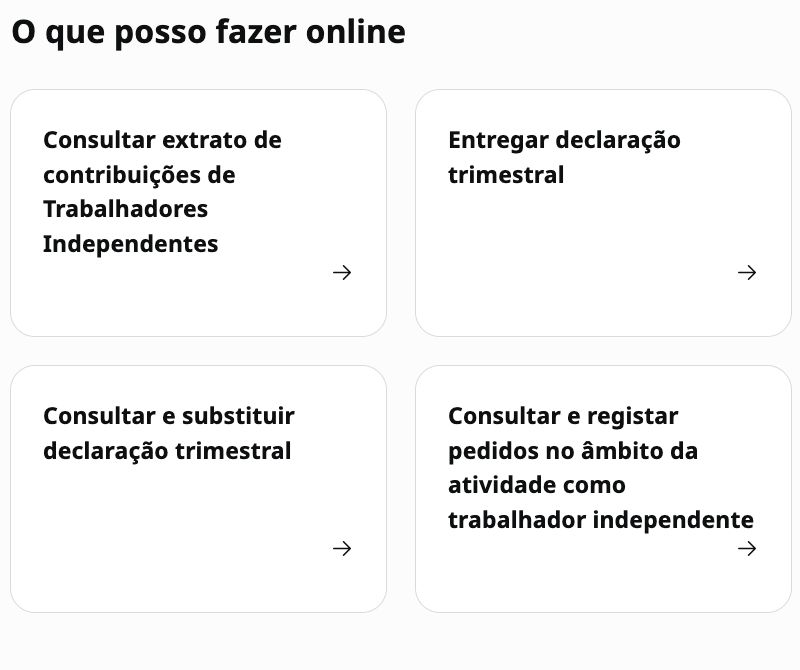
- Self-employed workers: file the quarterly declaration when required, consult the contribution calculation, obtain payment details and review the account statement.
- Employers: communicate employment relationships and remuneration through the employer services that apply to them.
- Families: consult and manage the benefits and requests available for their household.
Which login to choose
Need to activate CMD or recover access first? Follow the Chave Móvel Digital guide for the route matching your identity document. Test CMD on the official authentication portal before treating a Social Security identifier-matching error as a lost PIN.
The current registration guide documents the Social Security user route and authentication through Autenticação.gov, including Chave Móvel Digital. Use the methods actually displayed on the live login page; authentication options and screens can change independently of contribution law.
Important 2026 login change: two-factor authentication
Since 12 May 2026, two-factor authentication is mandatory when you sign in with a NISS and Social Security password. After the password, SSD sends a security code to the email address or mobile number recorded in the portal. The Social Security notice says this extra step does not apply when you enter with Chave Móvel Digital. Before you need the account urgently, check Profile > Personal data > View/change contacts and make sure at least one channel is current.
If you lose both the registered phone number and email account, the official recovery FAQ says to enter through Autenticação.gov with a Citizen Card or Chave Móvel Digital and then update the contacts. If that is not available, you must update them in person at a Social Security service desk. If you still control either the email or phone, use that channel to authenticate and replace the other one.
Keeping access after you leave Portugal
Before changing country or phone number, verify and update the contacts attached to your government authentication and Social Security record. Do not assume an old SMS number will remain usable abroad; test access while you can still use the current recovery channels.
Declarations and records
SSD exposes declarations and records according to the user's profile, including contribution-status and remuneration information. Use the document description and validity shown by SSD when you request it; do not rely on a third-party promise that every certificate is instant or valid for the same period.
Three checks to make after registration
- Confirm your recovery contacts
Check the email and mobile number stored under your profile. The May 2026 registration guide permits a foreign mobile number when it is correctly recorded, so do not replace a working number merely because it is not Portuguese.
- Read your contribution career
Go to Work > Remunerations and contributions > Contribution career > Consult contribution career. The official service shows a timeline and annual remuneration records. Compare them with your own payslips and employment history rather than assuming a missing period will correct itself.
- Track any correction request
If you ask Social Security to review the career record, keep the submission evidence and follow the request in SSD. The portal's current help area has a separate service for consulting the review request, its status and associated documents.
For self-employed workers: inspect the calculation
Do not look only at the amount due. In the self-employed contribution area, the official portal help says the monthly detail can show the days counted, contribution base, contribution rate, assessed amount, payment deadline and the reason for the assessment. It also exposes contribution history. Those fields help you identify whether an unexpected amount comes from the declared income, the base used, the applicable rate or a different assessment reason. For declaration dates and the statutory calculation, use our dedicated quarterly-declaration guide and confirm the live result in SSD.
When someone asks for proof of your position
Use the declaration of contribution status available under Work > Remunerations and contributions when that is the document requested. A contribution-career record, a payment receipt and a declaration of contribution status prove different things. Read the addressee's requirement first, then request the matching SSD document and verify the details and status displayed by the portal before sending it.
Moving between countries
If you worked in more than one EU/EEA country or Switzerland, social-security coordination may require Portuguese insurance-period records or a portable document. The correct document depends on the benefit and country; request it through the competent Social Security service rather than treating U-, P- or older E-form names as interchangeable.
If you fall behind
If the current account shows an unpaid amount, use the debt or current-account service shown in SSD and obtain the official simulation or payment-plan terms for that debt. Interest, enforcement stage, guarantees and instalment limits depend on the legal route and date; this guide does not state one fixed rate or plan as universal.
Registering your IBAN
For receiving benefits, check Perfil > Conta bancária > Consultar e alterar conta bancária in your authenticated account. The ISS July 2026 Prova Escolar guide, section F2 describes this online route and an MG 14 service-desk alternative with bank proof identifying the family-benefit payee as account holder. That is benefit-specific guidance, not a guarantee that every account or payment type can be changed online. Checked on 17 October 2026; the counter-only October 2024 news is not treated as the current universal rule.
- Check the holder and the account details privately before confirming anything. Never send Finkavo a bank statement, NISS, password or authentication code.
- A submitted IBAN still awaits Social Security validation. The guide says confirmation is sent to Mensagens; check that result rather than assuming the next benefit has already been redirected.
- If the option is missing or the request is rejected, use official support to establish the channel and evidence for your benefit. Do not repeatedly submit different bank details to try to bypass a restriction.
- Receiving benefits, authorising contribution direct debits and changing an AT tax-refund account are separate tasks. For debit permissions and cancellation, use the direct-debit guide; do not treat a new benefit IBAN as proof that another mandate or agency's record changed.
Worth knowing
- Check the SSD message and notification areas regularly, especially after filing a declaration or changing details.
- Review the remuneration and contribution record periodically and report discrepancies through the official contact channel with supporting documents.
- Do not assume a change made in another government system has already propagated to SSD; verify the result in the Social Security record.
Frequently asked questions
How do I get a declaration of contribution status from Social Security?
Request a declaração de situação contributiva, not a quarterly income declaration or a contribution-career statement. gov.pt says it certifies whether your Social Security situation is regularised or you have debts and can be obtained online, by post or at a service desk. Someone who has never worked and needs it for school or another non-debt purpose should request it at a Social Security desk.
Answer checked on
How long is the Social Security contribution-status certificate valid?
Four months. This is the validity of the declaração de situação contributiva under Article 84 of Decreto Regulamentar 1-A/2011, not the period covered by a quarterly declaration. Article 83 sets a maximum issue period of ten days from the request; do not assume every request is issued instantly. The certificate is not a receipt settling all liabilities and does not prevent later assessments.
Is Segurança Social Direta the same as Portal das Finanças?
No — they're two separate government portals. Portal das Finanças handles tax (NIF-based); Segurança Social Direta handles social contributions and benefits (NISS-based).
I'm a foreign national — can I register straight away?
You need an existing NISS. The gov.pt service updated 3 September 2026 provides the request route for applicants who do not already have one; identity, residence and purpose evidence depend on the case. An authorised representative or hiring employer can apply under the official conditions. Assignment of a NISS is separate from SSD account activation.
What's the fastest registration route?
An already active CMD lets you use Autenticação.gov without waiting for an SSD registration letter. If CMD is inactive or its identifier association is wrong, that must be resolved first. The NISS/password route needs a verification code and account activation; postal delivery normally takes eight working days according to the May 2026 leaflet, not a guaranteed deadline.
Answer checked on
Why does SSD ask for a second code after my password?
Two-factor authentication became mandatory on 12 May 2026 for login with a NISS and Social Security password. The code goes to a contact recorded in SSD. The official notice says the extra step does not apply to Chave Móvel Digital login.
What should I do if remuneration is missing from my contribution career?
Compare the official career record with your payslips and employment evidence, use the Social Security channel for a review, and retain the submission proof. SSD provides a separate area to check the review request, its status and documents.
As a freelancer, what do I actually do in SSD every quarter?
File the quarterly declaration when the Social Security rules require it, then inspect the assessment in SSD rather than relying on a generic formula. Our dedicated quarterly-declaration guide explains the current dates, calculation and exceptions from official sources.
How do I recover an SSD password?
Use Recuperar palavra-passe on the official portal. For Cidadão, the current public form asks for your NISS and birth date, then moves to the verification channel. Follow the channels actually offered; do not enter a NIF in place of the NISS. If the password is not the problem but the second-code contact is lost, use the contact-recovery route instead.
What if I lost my phone or email?
If one registered channel still works, receive the second code there, sign in and replace the unavailable contact. If both are lost, the official FAQ says to authenticate through Autenticação.gov with Citizen Card or CMD and update them. Without that alternative, update the contacts at a Social Security desk. Repeated password recovery is not a substitute for fixing the contacts.
Answer checked on
Can SSD send a code to a foreign phone?
Yes. The May 2026 registration leaflet allows a foreign mobile number when correctly recorded in the Social Security information system. Check the recorded number rather than assuming a Portuguese SIM is mandatory. Social Security, Finanças and CMD keep different authentication records; updating one does not prove the others changed.
Answer checked on
I received the code. Is my SSD account active?
Not yet if you have only requested registration. Open Ativar conta, provide your NISS and the received code, confirm it, then define and confirm your password. Sign in and update/validate your contacts afterwards. Keep the registration verification code separate from a later two-factor login code; never share either with an adviser.
Answer checked on
Get the free Portugal tax playbook
A first-year PDF: NIF and NISS, NHR vs IFICI vs IRS Jovem, the Modelo 3 annex map and the deadline calendar. Sent to your inbox.