Ato Isolado in Portugal: Issue the Document and Pay VAT
One occasional sale or job, documented on the Portal das Finanças, with VAT and IRS handled as separate steps.
Updated 2026-10-24, checked against official sources for the 2026 tax year.
7 min readWritten by the Finkavo team

An ato isolado records occasional paid work or a sale. Before issuing one, check whether the work is genuinely occasional and whether you already have, or recently closed, a registered activity. Then issue the right document, settle any VAT due and keep the records for IRS.
Check whether this is the right route
Portugal treats income from an isolated act as Category B income. Under Article 3 of the IRS Code, it must not result from a foreseeable or repeated practice. If you expect regular clients or repeated jobs, use the activity-opening guide to check registration before starting.
AT also states on its ato isolado page that someone who closed activity cannot use an ato isolado in the closure year or the following year and must restart activity. Check your registration history first, and see the guide to closing activity if you stopped recently.
The current law does not set the old €25,000 registration threshold for a single taxable operation. Article 31(3) of the VAT Code, in the wording in force since 1 July 2025, has no amount, and AT's own answer says individuals declaring an ato isolado no longer file the activity declaration, whatever the value. That change concerns the start-of-activity declaration. It does not make repeated work occasional or exempt the operation from VAT.
If you receive unemployment benefit, check the work and benefit rules before doing the job. A tax document does not establish that your benefit continues unchanged.
Prepare the transaction details
Have your customer details, description, agreed price, operation date and payment date ready. Check the VAT treatment before finalising the amount charged. For a foreign customer, use the foreign-client VAT guide to check where the service is taxable; do not apply the domestic steps automatically.
Issue the correct document
Open Faturas e Recibos > Emitir in the official service and choose Fatura ou Fatura-Recibo. Enter the actual transaction date before selecting Tipo. Use the table below to choose the document for your payment timing, as AT's document FAQ describes.
| Payment timing | Document |
|---|---|
| Customer pays when the operation takes place | Fatura-recibo de ato isolado |
| Customer pays later | Fatura de ato isolado, followed by its recibo when paid |
Check the customer, transaction date, VAT basis and totals before confirming. Download the issued document and give the customer their copy. AT's service manual says the ato isolado invoice-receipt is available only to people without a registered business or professional activity.
Article 36 of the VAT Code sets the general invoice deadline at the fifth working day after VAT becomes due. Advance payments, or payment coinciding with the taxable event, require the invoice on receipt. Check the applicable branch rather than waiting for a later payment to record the work.
Follow the illustrated AT instructions
The images below come from AT’s official service manual. Its ato isolado section refers readers to the shared invoice-field instructions.
- Check the transaction date and document type
Use the date the goods became available or the service was performed. For an advance, check the separate invoice-timing rule above. The Tipo choices depend on your situation.
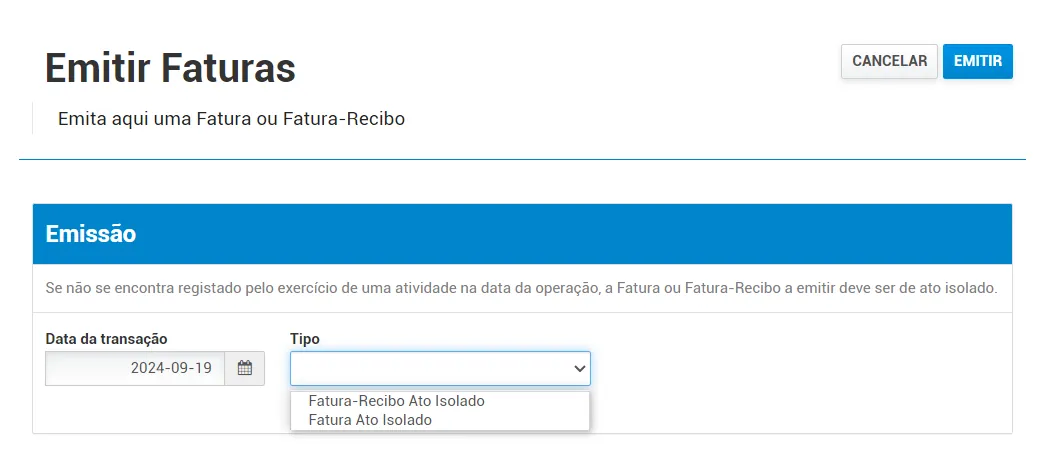
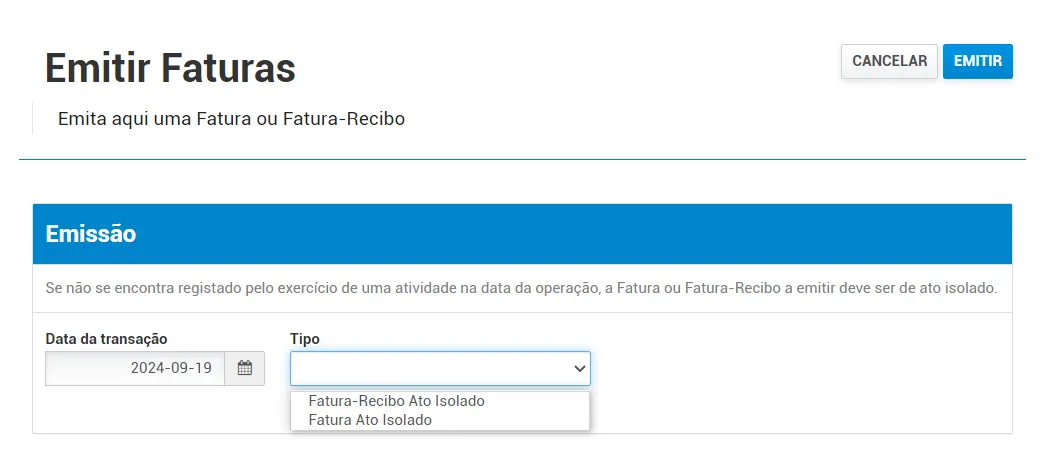
Official AT manual example. AT’s example shows Data da transação and the ato isolado choices under Tipo. The displayed 2024 date belongs to the source example; use the date of your real operation. Captured 25 October 2026. View official page, Open full-size image - Prepare the customer fields
Use the Adquirente section and the customer details required for your actual case. AT illustrates the customer fields on page 12 of its manual. For a foreign customer, check the foreign-client VAT guide before applying domestic treatment.
AT manual: customer fields, page 12Check VAT for foreign customers
- Describe the product or service
In Produtos, Serviços ou Outros, choose Adicionar. Complete the relevant item type, description, quantity, unit and price. Check whether the unit price includes VAT, then choose the applicable Taxa IVA or supported exemption reason.
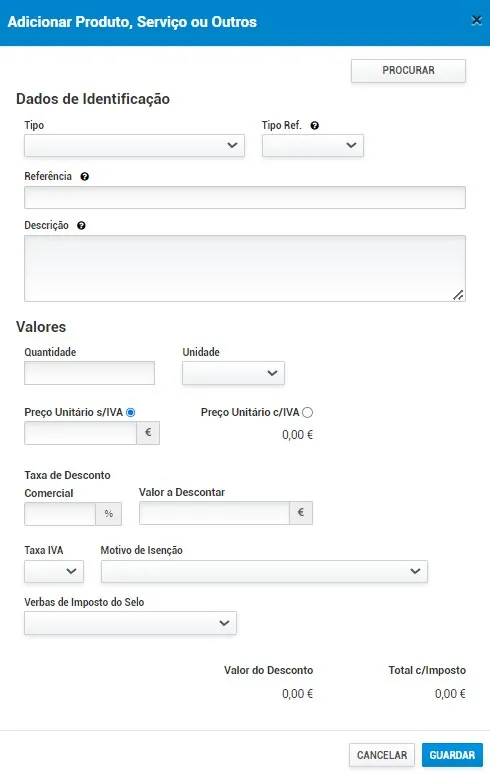
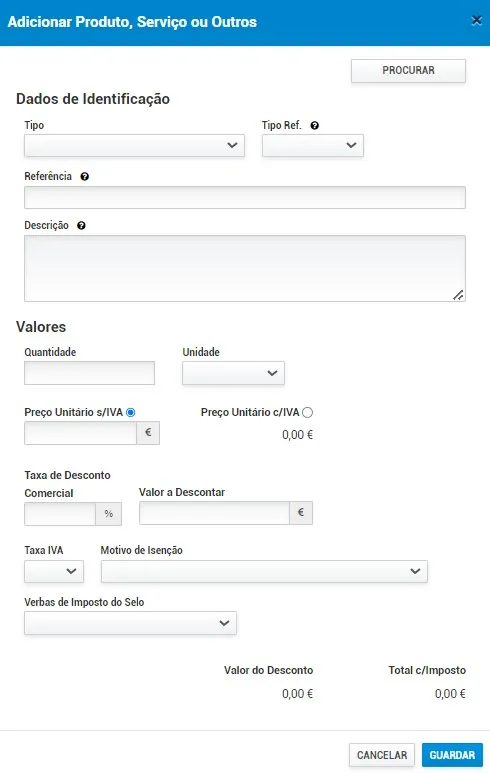
Official AT manual example. The shared item panel shows description, quantity, unit price and VAT fields. AT’s ato isolado instructions refer to these shared steps. The original source image is shown at its native size. Captured 25 October 2026. View official page, Open full-size image
Check the item before adding it
- Tipo and Descrição
- Choose the appropriate item type and describe the actual goods or service.
- Quantidade, Unidade and Preço Unitário
- Copy the agreed quantity, unit and price. Check the price-with/without-VAT choice.
- Taxa IVA and Motivo de Isenção
- Use the VAT treatment that applies to the operation. The empty example does not establish an exemption.
IRS withholding uses its own section when applicable. AT illustrates it on page 16 of its manual; keep the conditions in the IRS section of this guide. Open the official Faturas e Recibos service.
Pay VAT when due
For an operation taxable in Portugal, apply the relevant VAT rate unless the operation qualifies for an exemption, such as an applicable Article 9 exemption. AT gives medical activities located in Portugal as an example. A small invoice amount does not by itself supply that exemption.
Get the VAT payment document
- Open the issued document after a real transaction
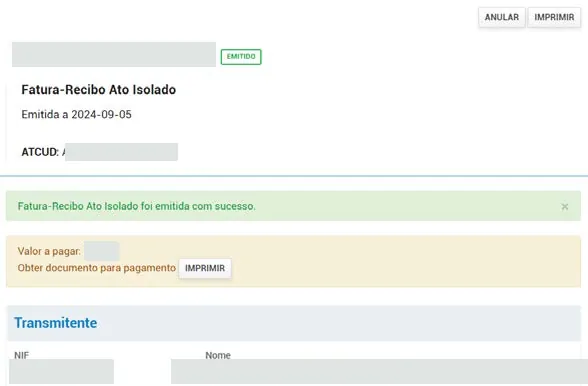
Use your own issued invoice or invoice-receipt. The official illustration below shows the post-issue view.
- Use the payment-document control
In the payment notice, choose Imprimir beside Obter documento para pagamento. AT identifies the resulting document as Modelo P2.
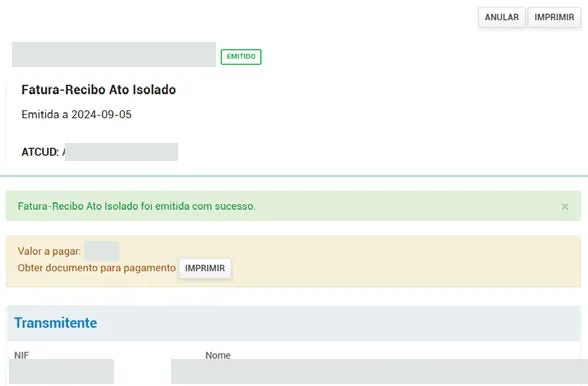
Official AT manual example. AT’s issued-document example shows Imprimir beside Obter documento para pagamento. Source example identifiers and amount are covered. Opening this document does not establish that VAT was paid. Captured 25 October 2026. View official page, Open full-size image - Check your document and retain payment proof
Check the amount and reference on your own P2. Keep the payment confirmation with the invoice.
Source: AT manual, page 61
For a single taxable operation, pay by the end of the month following completion of the operation, under CIVA Article 27(2). If the document is unavailable or its amount conflicts with the invoice, ask AT before the deadline.
Keep IRS separate from VAT
Withholding pays part of your IRS in advance. Your annual assessment determines the final tax bill. AT's ato isolado guidance describes withholding on payment by a customer with organised accounting, subject to the applicable waivers. It identifies a waiver for an amount below €15,000 and separate waivers for non-professional commercial, industrial or agricultural activity and, under Article 101-B of the IRS Code, for a withholding below €25. Check the conditions before choosing the receipt's withholding option.
Normally, report the income in Anexo B of the annual IRS return. AT applies the simplified-regime coefficients to ato isolado income while annual gross income is €200,000 or less; the simplified regime guide explains how those coefficients work. Article 58(2)(b) of the IRS Code provides a filing exemption for isolated acts below four times IAS only with its other-income conditions; paragraph 3 excludes certain cases, including joint taxation. Do not treat the withholding waiver as an exemption from the return or from IRS.
| Task | Keep | Next check |
|---|---|---|
| Customer documents | The invoice or invoice-receipt, and the associated receipt if payment came later. | Match the document to the actual operation and payment timing. |
| VAT | The Modelo P2 payment document and the VAT payment confirmation, where due. | Check the amount, reference and deadline. Retain the actual payment confirmation. |
| IRS | The withholding record, if applicable, and your annual-return decision with its supporting facts. | Check Anexo B or the specific filing-exemption conditions. A withholding waiver does not determine the final tax bill. |
Keep the issued documents, VAT payment evidence and IRS records linked to the same operation.
Use the first-return guide for the next filing step.
Frequently asked questions
Is there a 2026 income limit for an ato isolado?
The current Article 31(3) single-operation exception has no €25,000 amount. The nature of the operation still matters. Separate VAT, withholding and return-exemption rules have their own conditions.
Do I need to open activity for one ato isolado?
No declaration of activity is needed for a genuine single operation. AT states that, since 1 July 2025, individuals declaring an ato isolado are exempt from it whatever the value, and only issue the invoice or invoice-receipt. Repeated work still needs a registered activity.
Is an ato isolado exempt from VAT?
Not automatically. Establish where the operation is taxable and whether an actual exemption applies. AT identifies Article 9 exemptions for qualifying activities.
Answer checked on
When do I pay the VAT on an ato isolado?
By the end of the month following completion of the operation, using the Modelo P2 payment document the portal produces with the invoice. This is not the periodic VAT return calendar.
How much IRS will I pay?
The final result depends on the income, Category B treatment and the rest of your annual return. A withholding waiver does not establish a zero tax bill.
Get the free Portugal tax playbook
A first-year PDF: NIF and NISS, NHR vs IFICI vs IRS Jovem, the Modelo 3 annex map and the deadline calendar. Sent to your inbox.